
How to Obtain NADRA Digital Birth Certificate from Pakistan Online – Procedure & Required Documents
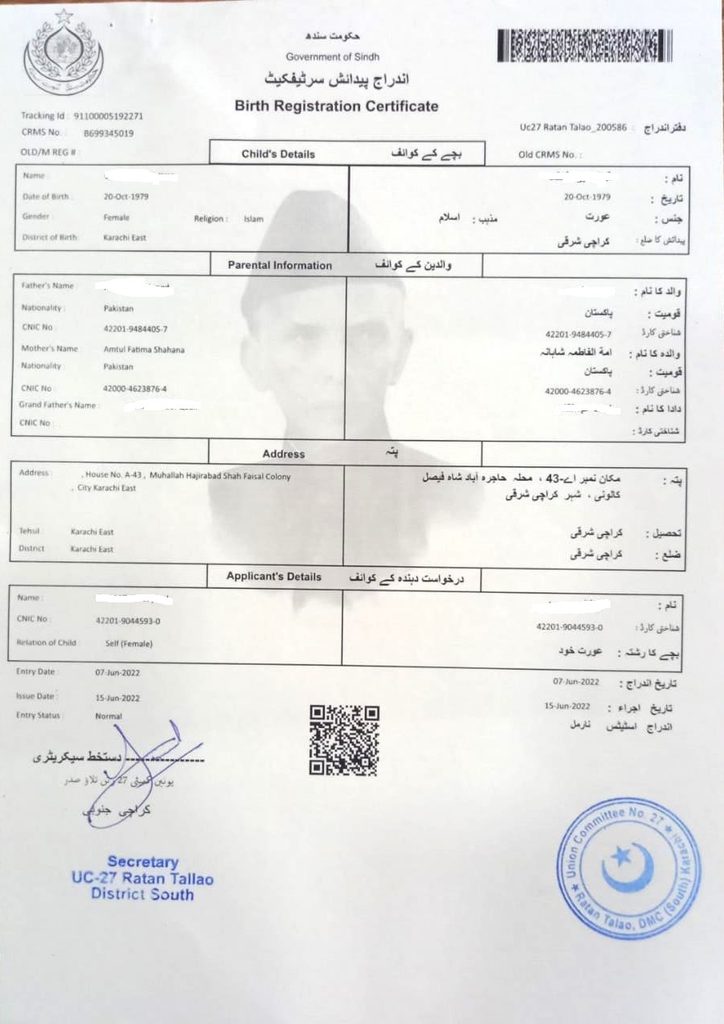
Nadra Digital birth certificate in Pakistan is becoming easier with digital services. NADRA’s PakID mobile app now supports birth registration through the relevant Union Council in selected areas.
This online facility allows parents or eligible family members to submit birth registration information from home instead of visiting the Union Council first. However, availability depends on the district. NADRA has announced that the service is being expanded to more areas of Pakistan.
What Is a NADRA Digital Birth Certificate?
Nadra Digital birth registration record is an electronically processed birth record connected with the government’s civil registration system.
It is important to understand that birth registration and NADRA’s Child Registration Certificate (CRC/Form-B) are different documents. Digital Birth registration is handled through the relevant local government/Union Council system, while NADRA uses birth information for identity-registration services such as the CRC.
Can You Apply for Birth Registration Online in Pakistan?
Yes, in selected districts. NADRA’s official PakID service currently provides online birth registration in certain areas.
According to NADRA’s official information, the facility is available in all districts of Punjab and selected districts of Sindh and Balochistan. The service is being extended to other areas.
Before applying, check whether online birth registration is available for your relevant Union Council or district.
Required Documents for Online Birth Registration in Pakistan
For online birth registration through NADRA PakID, the exact documents can vary according to the province, district and Union Council. NADRA confirms that PakID provides Provincial Civil Registration Services, including birth registration, in supported areas.
Generally, keep these documents ready:
- Father’s CNIC – clear copy/photo
- Mother’s CNIC – clear copy/photo
- Hospital birth certificate or birth proof – especially for a hospital birth
- Child’s details – full name, date of birth, gender and place of birth
- Parents’ information – names and CNIC numbers
- Marriage/Nikah Nama – if required for verification
- Mobile phone number – for application updates and verification
- Existing birth-registration record – if applying for correction or a related update
- Affidavit or additional proof – may be required for home births, late registration or special cases
Important Note
Do not confuse a birth certificate with NADRA’s CRC/Form-B. NADRA states that a computerized birth registration certificate from the relevant Union Council, Municipal Committee or Cantonment is used for CRC/juvenile registration.
For online registration, upload clear and readable documents and make sure the child’s name, date of birth and parents’ names match across all records. Additional documents may be requested if there is a discrepancy or special case.
How to Obtain a Digital Birth Certificate Online Through PakID
NADRA’s PakID mobile app provides Provincial Civil Registration Services, including birth registration, in areas where the service is supported.
Step 1: Download the PakID App
Download and install the official NADRA PakID mobile app on your Android or iPhone. NADRA identifies PakID as its official mobile application for digital services.
Step 2: Create Your PakID Account
Open the app and register your account using your CNIC, mobile number and email address. You may need to verify OTP codes sent to your mobile and email.
Step 3: Select Birth Registration
After logging in, look for the Birth Registration option under the available Provincial Civil Registration Services.
Step 4: Enter the Child’s Details
Provide the required information, such as:
- Child’s full name
- Date of birth
- Gender
- Place of birth
- Father’s details
- Mother’s details
- Current and permanent address
Enter the information carefully because spelling and date-of-birth errors can cause problems later.
Step 5: Upload Required Documents
Upload clear photographs or scans of the required documents. PakID supports document uploading through the app.
Usually, you should keep the father’s and mother’s CNICs and birth/hospital proof ready. Additional documents may be required depending on the case and local registration authority.
Step 6: Complete Verification
Follow the verification instructions shown in the app. Depending on the application, biometric or other verification may be required.
Step 7: Pay the Applicable Fee
If a fee is shown for your application, pay it through the payment method available for that service. NADRA lists card and Raast among its online payment options.
Step 8: Submit the Application
Review all information and uploaded documents, then submit your birth-registration application.
Step 9: Track Your Application
Keep your Tracking ID/Application Number safe. PakID provides application-tracking facilities.
Step 10: Receive the Birth Certificate
After approval, follow the instructions provided in PakID for receiving or accessing the registered birth certificate.
Important Note
Birth Registration Certificate and NADRA CRC/Form-B are different documents. NADRA uses verified computerized birth certificates issued by the relevant Union Council, Municipal Committee or Cantonment as part of its identity-registration requirements.
Also, online birth registration availability can depend on the relevant provincial/local civil-registration service, so the exact options shown in PakID may differ by location.
What If Online Birth Registration Is Not Available in Your Area?
If online birth registration is not available in your area through PakID, you can still register the birth through the relevant local government office. Birth registration is handled through the Provincial Civil Registration Management System (CRMS), which covers Union Councils and other authorized registration offices.
What You Should Do
- Visit Your Relevant Union Council
Contact the Union Council where the child’s birth should be registered. - Take the Required Documents
Usually, parents’ CNICs and the child’s hospital/birth proof are important supporting documents. Requirements can vary by local authority. - Submit the Birth Registration Form
Provide the child’s name, date of birth, place of birth and parents’ information. - Complete Verification
The Union Council may verify the information and supporting documents before registering the birth. - Pay the Applicable Fee
If a fee applies, pay it according to the local authority’s current schedule. - Collect the Computerized Birth Certificate
After registration and approval, the relevant authority can issue the computerized birth certificate.
Important Point
NADRA provides technical support for Pakistan’s civil-registration system, but birth registration itself is linked to provincial and local government authorities. NADRA’s PakID currently provides Provincial Civil Registration Services in supported areas.
If your area is not supported online, do not use unofficial websites or agents. Contact your Union Council or relevant local government office for the correct procedure.
Why Is a Birth Certificate Important?
A birth certificate is an important official record of a person’s birth. It can be needed for many government, education and legal services.
- Proof of Birth: Confirms the person’s name, date and place of birth.
- NADRA Records: Helps with obtaining a CRC/Form-B and later identity documents.
- School Admission: May be required when enrolling a child in school.
- Passport Application: Can be used as a supporting document for passport-related services.
- Visa & Immigration: Often required as proof of identity and family relationship.
- Family Records: Helps establish the child’s relationship with parents.
- Government Services: May be required for various official applications and benefits.
- Correction of Records: Provides an official record that can help resolve date-of-birth or parent-information issues.
- Future Legal Needs: A birth record can be important throughout a person’s life for official and legal purposes.
In simple words: A birth certificate is one of the most important documents for proving who a person is, when they were born, and who their parents are.
Common Problems With Online Birth Registration
While applying for a digital birth certificate online through PakID, applicants may face some common problems. Here are the main issues in simple words:
- Online Service Not Available: Birth registration may not yet be available online in every area.
- Incorrect Information: A spelling mistake in the child’s name or an incorrect date of birth can cause problems.
- Document Upload Error: Blurry, incomplete or unreadable documents may be rejected.
- CNIC Information Mismatch: Parents’ names or CNIC details may not match the available government records.
- Verification Problems: The application may require additional verification if the information cannot be confirmed.
- Late Birth Registration: Late registrations may require extra documents or approval from the relevant authority.
- Hospital Record Issues: Missing or incorrect hospital birth records can delay registration.
- Payment Problems: An unsuccessful online payment may prevent the application from being completed.
- Technical Problems: App errors, internet issues or server problems can temporarily affect the application.
- Application Delays: Processing time may vary depending on verification and the relevant local registration authority.
Important Tip
Before submitting your application, check the child’s name, date of birth, parents’ details and uploaded documents carefully. Keeping the original documents available can also help if additional verification is required.
Frequently Asked Questions (FAQs)
1. Can I register a birth online through PakID?
Yes, online birth registration is available through PakID in supported areas.
2. Why is my area not showing the birth registration option?
The service may not yet be available for your district or local registration authority.
3. What documents are needed for online birth registration?
Usually, parents’ CNICs, the child’s birth or hospital record, and the child’s basic details are required.
4. What if my documents are rejected?
Check that all documents are clear, complete and contain matching information. You may need to provide additional documents.
5. Can I apply for late birth registration online?
It depends on the rules and online availability in your area. Late registration may require additional verification or documents.
6. Is a birth certificate the same as Form-B?
No. A birth certificate and NADRA CRC/Form-B are separate documents.
7. Can I use a birth certificate for a visa application?
Yes, a birth certificate may be required as a supporting document for visa or immigration applications, depending on the country’s requirements.
8. What should I do if my online application is delayed?
Use the available application-tracking facility and contact the relevant NADRA or local registration authority if further assistance is needed.
9. Can I correct information after submitting the application?
Corrections depend on the type of error and the rules of the relevant registration authority. It is best to check all details before submission.
10. Is online birth registration available throughout Pakistan?
Not necessarily. Availability depends on the relevant provincial and local civil-registration services.